학습 목표

1. Queue 에 대한 개념을 알아 보자.
2. 배열을 활용한 큐(Queue) 구현하기
3. 배열을 활용한 큐를 순환 구조로 수정해 보기
Queue 에 대한 개념을 알아 보자.
큐 Queue는 데이터를 저장하는 선형 자료구조로, 차례를 기다리는 줄이라는 의미를 가지고 있는 단어처럼 먼저 들어온 자료부터 순서대로 처리하는 방식을 말한다.
한 쪽 끝에서는 자료의 삽입 연산만 가능하고 반대쪽 끝에서는 삭제만 가능한 구조로서 선입선출(FIFO : First In First Out)의 특징을 가진다.
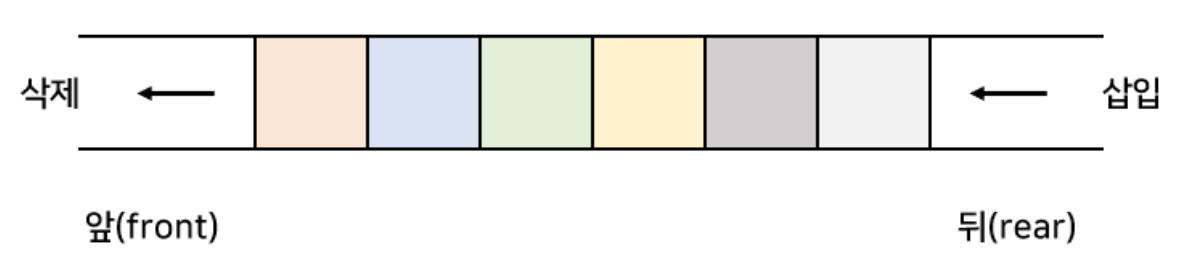
Queue의 특징
- 맨 앞(front) 에서 자료를 꺼내거나 삭제하고, 맨 뒤(rear)에서 자료를 추가 함
- Fist In First Out (선입선출) 구조
- 일상 생활에서 일렬로 줄 서 있는 모양
- 순차적으로 입력된 자료를 순서대로 처리하는데 많이 사용 되는 자료구조
- 콜센터에 들어온 문의 전화, 메세지 큐 등에 활용됨
- jdk 클래스 : ArrayList
package structure.ch03;

public class IntArrayQueue {

	private int[] array;
	private int front; // 큐의 시작 지점
	private int rear; // 큐의 끝 지점
	private int capacity; // 큐의 용량
	private int size; // 요소의 개수

	public IntArrayQueue(int capacity) {
		this.capacity = capacity;
		array = new int[this.capacity];
		this.front = 0; // 시작지점 0
		this.rear = -1; // 0 뒤에 -1로 초기값 지정
		this.size = 0; // 요소의 개수
	} // 생성자

	// 편의 기능 만들어 보기
	public boolean isEmpty() {
		return size == 0;
	} // 비어있을때

	public boolean isFull() {
		return size == capacity;
	} // 꽉 찼을 때

	// todo - 1 데이터 넣기 기능 구현
	public void enqueue(int item) {
		// 방어적 코드
		if (isFull()) {
			System.out.println("큐 메모리 공간이 가득 찼습니다.");
		} else {
			// rear
			rear++; // -1 에서 0 으로 만든다. (첫 동작 시)
			array[rear] = item; // array[0] = item;
			size++; // 요소의 개수 추가
		}
	} // end of enqueue()

	// todo - 2 데이터 꺼내기
	public int dequeue() {
		int item = -9999;
		if (isEmpty()) {
			System.out.println("큐 메모리 공간에 요소가 없음");
		} else {
			// 잠시 데이터 꺼내 보기
			item = array[front]; // 0 번째 요소에 접근
			// 100, 200, 300
			// f - 0 (첫 꺼낼 시)
			for (int i = front; i < rear; i++) {
				// array[0] = array[0 + 1]
				// 200, 200, 300 -- for : 1번 동작
				// 200, 300, 300 -- for : 2번 동작
				array[i] = array[i + 1];
			}
			// 200, 300, 0
			// 마지막 요소를 초기화 처리 한다.
			array[rear] = 0; // array[] 마지막 값을 0 으로 지정한다.
			rear--; // 큐의 끝 지점 삭제
			size--; // 큐의 요소의 개수 삭제
		}
		return item;
	}

	// todo - 3 데이터 찾기 (peek)
	public int peek() {
		if (isEmpty()) {
			System.out.println("큐 메모리 공간에 요소가 없습니다.");
			return -9999;
		} else {
			// peek --> 맨 처음 들어온 녀석부터 꺼내지고 삭제 처리 된다.
			return array[front]; // - 수정
		}
	}

	// 코드 테스트
	public static void main(String[] args) {

		IntArrayQueue queue = new IntArrayQueue(3);

		// 데이터 넣기
		queue.enqueue(100);
		queue.enqueue(200);
		queue.enqueue(300);
		//queue.enqueue(400); // 안들어 감

		// 데이터 꺼내고 삭제 처리
		// queue.dequeue(); // 맨 처음 들어온 녀석부터 꺼내지고 삭제처리 된다. (핵심)

		System.out.println(queue.dequeue());
		System.out.println(queue.dequeue());
		System.out.println(queue.dequeue());
		System.out.println(queue.dequeue());

		//System.out.println(queue.peek());

	} // end of main

} // end of class
배열을 활용한 큐를 순환 구조로 수정해 보기

package structure.ch03;

public class IntArrayQueue2 {

	private int[] array;
	private int front; // 큐의 시작 지점
	private int rear; // 큐의 끝 지점
	private int capacity; // 큐의 용량
	private int size; // 요소의 개수

	public IntArrayQueue2(int capacity) {
		this.capacity = capacity;
		array = new int[this.capacity];
		this.front = 0; // 시작지점 0
		this.rear = -1; // 0 뒤에 -1로 초기값 지정
		this.size = 0; // 요소의 개수
	} // 생성자

	// 편의 기능 만들어 보기
	public boolean isEmpty() {
		return size == 0;
	} // 비어있을때

	public boolean isFull() {
		return size == capacity;
	} // 꽉 찼을 때

	// todo - 1 데이터 넣기 기능 구현
	public void enqueue(int item) {
		// 코드 수정
		// [10] [20] [30]
		// 나머지 연산자를 활용 한다 (순환구조)
		// 1 = 1 % 5 몫 0, 나머지 1
		// 2 = 2 % 5 몫 0, 나머지 2

		// 0 = (-1 +1) % 3 (임시 값 3)
		// 1 = (0 + 1) % 3
		// 2 = (1 + 1) % 3
		// 0 = (2 + 1) % 3
		// 1 = (0 + 1) % 3
		// 2 = (1 + 1) % 3
		rear = (rear + 1) % capacity;
		array[rear] = item;
		size++;

	} // end of enqueue()

	// todo - 2 데이터 꺼내기
	public int dequeue() {

		if (isEmpty()) {
			System.out.println("Queue is empty");
			return -9999;
		}

		int item = array[front];
		// [10] [20] [30]
		front = (front + 1) % capacity;
		return item;
	} // end of dequeue()

	public void printAll() {
		if (isEmpty()) {
			System.out.println("Queue is Empty");
			return;
		}
		for (int i = 0; i < array.length; i++) {
			System.out.print(array[i] + " ");
		}
		System.out.println();
	} // end of printAll()

	// 코드 테스트
	public static void main(String[] args) {

		IntArrayQueue2 queue = new IntArrayQueue2(3);

		// 데이터 넣기
		queue.enqueue(100);
		queue.enqueue(200);
		queue.enqueue(300);
		queue.enqueue(400); // 안들어 감
		// queue.enqueue(500); // 안들어 감

		// queue.enqueue(19);

		System.out.println(queue.dequeue());
		System.out.println(queue.dequeue());
		System.out.println(queue.dequeue());
		System.out.println(queue.dequeue());
		System.out.println(queue.dequeue());
		System.out.println(queue.dequeue());

		// queue.printAll();

	} // end of main

} // end of class
'Java' 카테고리의 다른 글
| 2024.05.07 Swing 프로젝트 bubble - 9 (버블 생성 동작 수정) (0) | 2024.05.07 |
|---|---|
| 2024.05.07 Swing 프로젝트 bubble - 8 (물방울 벽 감지) (0) | 2024.05.07 |
| 2024.05.03 Swing 프로젝트 bubble - 7 (버블 동작 처리) (0) | 2024.05.03 |
| 2024.05.03 Swing 프로젝트 bubble - 6 (바닥 층 감지 기능 추가) (0) | 2024.05.03 |
| 2024.05.03 Swing 프로젝트 bubble - 5 (물방울 생성) (0) | 2024.05.03 |