Chrome 확장 프로그램 Talend API Test를 다운받는다.
Talend API Tester - Free Edition
Visually interact with REST, SOAP and HTTP APIs.
chromewebstore.google.com

더보기
package ch01;

import java.io.IOException;
import java.net.InetSocketAddress;

import com.sun.net.httpserver.*;

public class SimpleHttpServer {

	public static void main(String[] args) {

		try {
			HttpServer.create(new InetSocketAddress(8080), 0);

		} catch (IOException e) {
			// TODO Auto-generated catch block
			e.printStackTrace();
		}

	}
}
더보기
package ch01;

import java.io.IOException;
import java.io.OutputStream;
import java.net.InetSocketAddress;

import com.sun.net.httpserver.HttpExchange;
import com.sun.net.httpserver.HttpHandler;
import com.sun.net.httpserver.HttpServer;

public class SimpleHttpServer {

	public static void main(String[] args) {

		// HttpServer.create(new InetSocketAddress(8080), 0);
		// 8080 <-- https, 80 <-- http (포트번호 생략 가능하다.)
		try {
			// 포트번호 8080으로 HTTP 서버 생성
			HttpServer httpServer = HttpServer.create(new InetSocketAddress(8080), 0);

			// 서버에 대한 설정들이 필요하다.

			// 프로토콜 정의 (경로, 핸들러 처리),
			// 핸들러 처리를 내부 정적 클래스로 사용
			httpServer.createContext("/test", new MyTestHandler());
			httpServer.createContext("/hello", new HelloHandler());

			// 서버 시작 명령
			httpServer.start();
			System.out.println(">> My Http Server Started on port 8080");

		} catch (IOException e) {
			// TODO Auto-generated catch block
			e.printStackTrace();
		}

	} // end of main

	// http/localhost:8080/test <-- 주소 설계
	static class MyTestHandler implements HttpHandler {

		@Override
		public void handle(HttpExchange exchange) throws IOException {

			// 사용자의 요청 방식(Method) 방식이 Get, Post 인지 알아야 우리가 동작 시킬 수 있다.
			String method = exchange.getRequestMethod();
			System.out.println("method : " + method);

			if("GET".equalsIgnoreCase(method) ) {
				// 대문자 소문자 구분없이 "Get" 이라면 여기 동작
				//System.out.println("여기는 Get 방식으로 호출 됨");

				// GET -->  path: /test 라고 들어오면 어떤 응답 처리를 내려 주면 된다.
				handleGetRequest(exchange);

			} else if("POST".equalsIgnoreCase(method)) {
				// Post 요청시 여기 동작
				//System.out.println("여기는 Post 방식으로 호출 됨");
				handlePostRequest(exchange);
			} else {
				String response = "Unsupported Methdo : " + method;
				exchange.sendResponseHeaders(405, response.length()); // Method Not Allowed
				OutputStream os = exchange.getResponseBody();
				os.write(response.getBytes());
				os.flush();
				os.close();
			}

		} // end of handle

		// Get 요청시 동작 만들기
		private void handleGetRequest(HttpExchange exchange) throws IOException {

			String response = """
					<!DOCTYPE html>
					<html lang = ko>

						<head></head>
						<body>
							<h1 style = "background-color:red"> Hello path by / test </h1>
						</body>

					</html>
				""";

			//String response = "Hello Get Request"; // 응답 메세지
			exchange.sendResponseHeaders(200, response.length());
			OutputStream os = exchange.getResponseBody();
			os.write(response.getBytes()); // 응답 본문 전송
			os.close();

		}

		// Post 요청시 동작 만들기
		private void handlePostRequest(HttpExchange exchange) throws IOException{
			// get 요청은 HTTP 메세지에 Body 영역이 존재하지 않는다.
			// post 요청은 HTTP 메세지에 Body 영역이 존재한다.
			String response = """
					<!DOCTYPE html>
					<html lang = ko>

						<head></head>
						<body>
							<h1 style = "background-color:red"> Hello path by / test </h1>
						</body>

					</html>
				""";
			// HTTP 응답 헤더 설정
			exchange.setAttribute("Content-Type", "text/html; charset=UTF-8");
			exchange.sendResponseHeaders(200, response.length());

			// getResponseBody
			OutputStream os = exchange.getResponseBody();
			os.write(response.getBytes());
			os.flush();

			os.close();
		}

	} // end of MyTestHandler

	static class HelloHandler implements HttpHandler {

		@Override
		public void handle(HttpExchange exchange) throws IOException {

			// 사용자의 요청 방식(Method) 방식이 Get, Post 인지 알아야 우리가 동작 시킬 수 있다.
			String method = exchange.getRequestMethod();
			System.out.println(" hello method : " + method);

		} // end of handle

	} // end of HelloHandler

} // end of class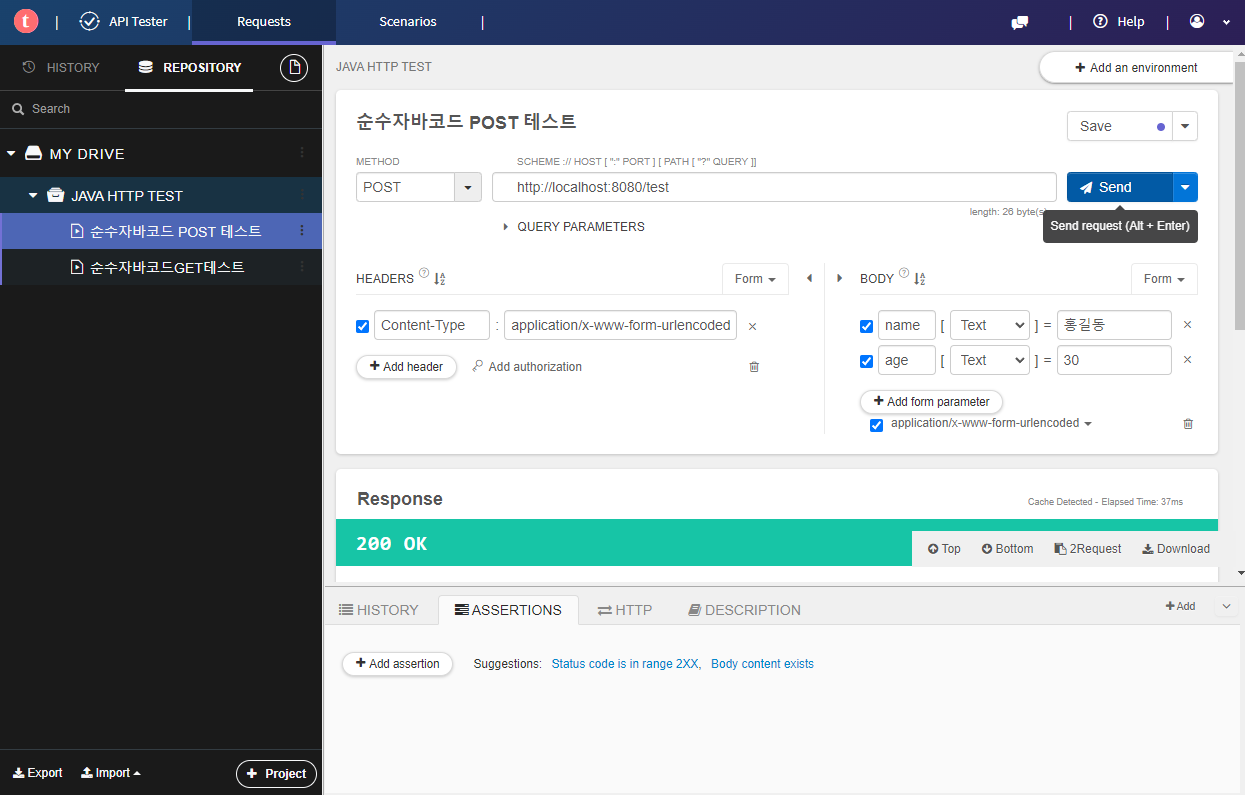
'Java' 카테고리의 다른 글
| 2024.06.04 Java 유용한 클래스 공공데이터포탈 사용해 보기 (0) | 2024.06.04 |
|---|---|
| 2024.06.03 JDK 아마존 --> JDK 오라클 변경 (0) | 2024.06.03 |
| 2024.06.03 Java 유용한 클래스 소켓을 활용한 HTTP 통신이란 (0) | 2024.06.03 |
| 2024.06.03 Java 유용한 클래스 제네릭(Generic) (0) | 2024.06.03 |
| 2024.05.27 Sprint Tool Suite lombok 적용 (0) | 2024.05.27 |