학습 목표

사용자 요청 list.jsp 에서 해당 계좌 번호 선택 - (list.jsp 링크 수정 해야 함)

1. detail.jsp 만들기
2. account/list.jsp 파일에 링크 추가 하기
3. 계좌 상세 보기 기능 구현

2. AccountController 주소 설계 및 코드 추가
3. 거래 내역 쿼리 확인 후 DTO 설계 - HistoryDTO
4. AccountService 상세 보기 기능 구현
    단일 계좌 검색 기능 추가
    거래 내역 확인 기능 추가 (동적 쿼리 생성)
5. utils/TimestampUtil 클래스 추가 - 시간 포맷 기능
6. #,### 금액 단위 포맷 기능 추가 - HistoryDto 클래스에 기능 추가
코드상에서 사용할 쿼리 다시 확인
-- 코드상에서 사용할 쿼리 생성
-- 출금에 대한 쿼리 출력
-- receiver : 금액을 받는 대상,
-- 기능적으로 하나의 JSP 페이지에서 전체 쿼리에 대한 결과 집합에
-- 컬럼명을 동일하게 사용할 수 있도록 쿼리를 수정합니다 (같은 모델 클래스에 담을 예정)
-- 출금에는 AMT 출금, 1111 ---> 2222 이체
select h.id, h.amount, h.w_balance AS balance, h.created_at,
	   coalesce(cast(da.number as CHAR(10)), 'ATM')  as receiver,
       wa.number as sender
from history_tb as h
left join account_tb as wa on wa.id = h.w_account_id
left join account_tb as da on da.id = h.d_account_id
where h.w_account_id = 1;


-- 입금에 대한 쿼리 출력 ( AMT 입금, 다른계좌에서 --> 1111계 받거나)
select h.id, h.amount, h.d_balance as balance, h.created_at,
	coalesce(CAST(wa.number as CHAR(10)) , 'ATM') as sender,
    da.number as receiver
from history_tb as h
left join account_tb as wa on wa.id = h.w_account_id
left join account_tb as da on da.id = h.d_account_id
where h.d_account_id = 1;


-- 입,출금 전체 쿼리
select h.id, h.amount,
	case
		when h.w_account_id = 1 then (h.w_balance)
        when h.d_account_id = 1 then (h.d_balance)
    end  as balance,
    coalesce(cast(wa.number as char(10)), 'ATM') as sender,
    coalesce(cast(da.number as char(10)), 'ATM') as receiver,
    h.created_at
from history_tb as h
left join account_tb as wa on h.w_account_id = wa.id
left join account_tb as da on h.d_account_id = da.id
where h.w_account_id = 1 OR h.d_account_id = 1;

select * from history_tb
1. detail.jsp 만들기
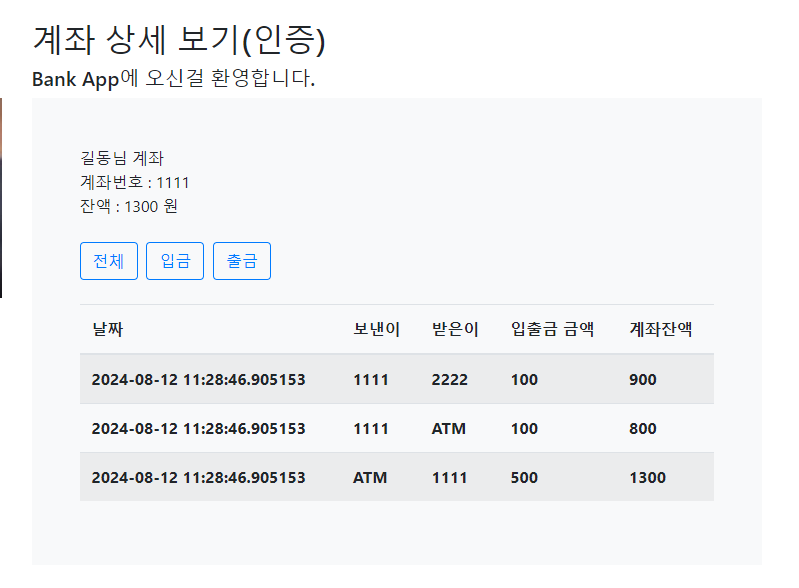
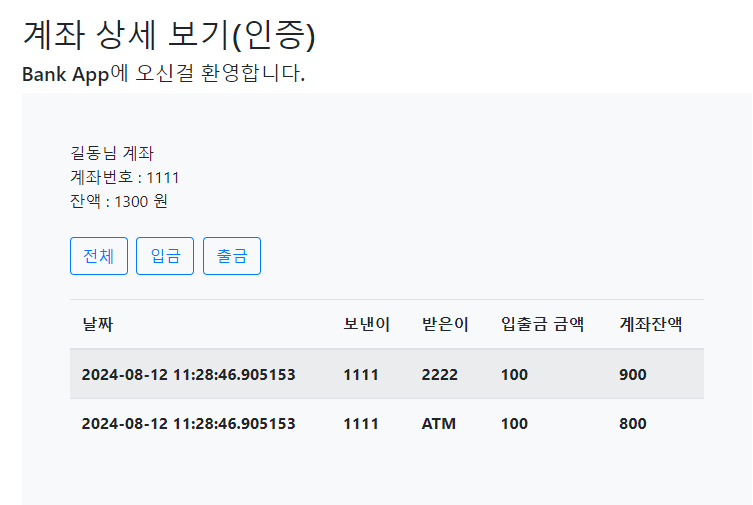
계좌 상세 보기 화면은 계좌 목록 페이지에서 존재하는 하나의 계좌 번호를 선택했을 때 DB에서 데이터를 조회하고 결과를 화면에 출력해야 합니다. 한 번에 작업을 하면 어려움이 있을 수 있으니 기본 화면부터 만들고 기능을 추가하도록 합시다.
계좌 상세 보기 화면은 계좌 목록 페이지에서 존재하는 하나의 계좌 번호를 선택했을 때 DB에서 데이터를 조회하고 결과를 화면에 출력해야 합니다. 한 번에 작업을 하면 어려움이 있을 수 있으니 기본 화면부터 만들고 기능을 추가하도록 합시다.
샘플 화면 확인
Table 태그와 부트스트랩4 을 활용하여 약간에 CSS 를 추가 하겠습니다.

list.jsp
list.jsp
변경부분
<tbody>
	<c:forEach  var="account"   items="${accountList}">
		<tr>
			<%-- 동적 작동하는 부분 Type=all --%>
			<td> <a href="/account/detail/${account.id}?Type=all">${account.number}</a> </td>
			<td>${account.balance}</td>
		</tr>
	</c:forEach>
</tbody>
전체코드
<%@ page language="java" contentType="text/html; charset=UTF-8" pageEncoding="UTF-8"%>

<!-- header.jsp  -->
<%@ include file="/WEB-INF/view/layout/header.jsp"%>

<!-- start of content.jsp(xxx.jsp)   -->
<div class="col-sm-8">
	<h2>계좌목록(인증)</h2>
	<h5>Bank App에 오신걸 환영합니다.</h5>
	<%-- 주소 설계 : http://localhost:8080/user/sign-up  --%>


	<%-- 계좌가 없는 경우와 계좌가 있는 경우를 분리할 것이다. --%>
	<%-- 계좌가 있는 사용자 일 경우 반복문을 활용할 예정 --%>


	<c:choose>
		<c:when test="${accountList != null}">
			<%-- 계좌가 존재한다. html 주석사용하면 오류 발생 : 자바코드로 변경되면 오류발생 --%>
			<%-- 계좌 존재 : HTML 주석을 사용하면 오류 발생 (jstl 태그 안에서) --%>
			<table class="table">
				<thead>
					<tr>
						<th>계좌 번호</th>
						<th>잔액</th>
					</tr>
				</thead>
				<tbody>
					<c:forEach  var="account"   items="${accountList}">
						<tr>
							<%-- 동적 작동하는 부분 Type=all --%>
							<td> <a href="/account/detail/${account.id}?Type=all">${account.number}</a>  </td>
							<td>${account.balance}</td>
						</tr>
					</c:forEach>
				</tbody>
			</table>

		</c:when>
		<c:otherwise>
			<div class="jumbotron display-4">
				<h5>아직 생성된 계좌가 없습니다.</h5>
			</div>
		</c:otherwise>
	</c:choose>

</div>
<!-- end of content.jsp(xxx.jsp)   -->

</div>
</div>

<!-- footer.jsp  -->
<%@ include file="/WEB-INF/view/layout/footer.jsp"%>
AccountController 변경부분
AccountController
변경부분
/**
	 * 계좌 상세 보기 페이지
	 * 동적으로 작동한다.
	 * 주소 설계 : localhost:8080/account/detail/${account.id}?type=all
	 * 주소 설계 : localhost:8080/account/detail/${account.id}?type=deposit
	 * 주소 설계 : localhost:8080/account/detail/${account.id}?type=withdraw
	 * @return
	 */
	@GetMapping("/detail/{accountId}")
	public String detail(@PathVariable(name = "accountId") Integer accountId, @RequestParam (required = false, name = "type") String type)  {

		// 인증검사 추후 추가


		// localhost:8080/account/detail/${4}
		System.out.println("@PathVariable : " + accountId);
		//  localhost:8080/account/detail/${account.id}?type=all
		System.out.println("@RequestParam : " + type);
		return "account/detail";
	}
AccountController 전체부분
AccountController
package com.tenco.bank.controller;

import java.util.Arrays;
import java.util.List;

import org.springframework.beans.factory.annotation.Autowired;
import org.springframework.http.HttpStatus;
import org.springframework.stereotype.Controller;
import org.springframework.ui.Model;
import org.springframework.web.bind.annotation.GetMapping;
import org.springframework.web.bind.annotation.PathVariable;
import org.springframework.web.bind.annotation.PostMapping;
import org.springframework.web.bind.annotation.RequestMapping;
import org.springframework.web.bind.annotation.RequestParam;

import com.tenco.bank.dto.DepositDTO;
import com.tenco.bank.dto.SaveDTO;
import com.tenco.bank.dto.TransferDTO;
import com.tenco.bank.dto.WithdrawalDTO;
import com.tenco.bank.handler.exception.DataDeliveryException;
import com.tenco.bank.handler.exception.UnAuthorizedException;
import com.tenco.bank.repository.model.Account;
import com.tenco.bank.repository.model.HistoryAccount;
import com.tenco.bank.repository.model.User;
import com.tenco.bank.service.AccountService;
import com.tenco.bank.utils.Define;

import jakarta.servlet.http.HttpSession;

@Controller // IOC 대상 (싱글톤으로 관리)
@RequestMapping("/account")
public class AccountController {

	// 계좌 생성 화면 요청 - DI 처리
	private final HttpSession session;
	private final AccountService accountService;

	@Autowired
	public AccountController(HttpSession session, AccountService accountService) {
		this.session = session; // 의존 주입
		this.accountService = accountService; // 의존 주입
	}

	/**
	 * 계좌 생성 페이지 요청 주소설계 : http://localhost:8080/account/save :
	 *
	 * @return
	 */
	@GetMapping("/save")
	public String savePage() {

		// 1. 인증 검사가 필요 (account 전체가 필요함)
		User principal = (User) session.getAttribute(Define.PRINCIPAL);
		if (principal == null) {
			throw new UnAuthorizedException(Define.NOT_AN_AUTHENTICATED_USER, HttpStatus.UNAUTHORIZED);
		}

		return "account/save";
	}

	/**
	 * 계좌 생성 기능 요청 주소 설계 : http://localhost:8080/account/save
	 *
	 * @retrun : 추후 계좌 목록 페이지 이동 처리
	 */

	@PostMapping("/save")
	public String saveProc(SaveDTO dto) {
		// 1. form 데이터 추출 (파싱 전략)
		// 2. 인증 검사
		// 3. 유효성 검사
		// 4. 서비스 호출
		User principal = (User) session.getAttribute(Define.PRINCIPAL);

		// 인증 검사
		if (principal == null) {
			throw new UnAuthorizedException(Define.NOT_AN_AUTHENTICATED_USER, HttpStatus.UNAUTHORIZED);
		}

		if (dto.getNumber() == null || dto.getNumber().isEmpty()) {
			throw new DataDeliveryException(Define.ENTER_YOUR_ACCOUNT_NUMBER, HttpStatus.BAD_REQUEST);
		}

		if (dto.getPassword() == null || dto.getPassword().isEmpty()) {
			throw new DataDeliveryException(Define.ENTER_YOUR_PASSWORD, HttpStatus.BAD_REQUEST);
		}

		if (dto.getBalance() == null || dto.getBalance() <= 0) {
			throw new DataDeliveryException(Define.ENTER_YOUR_BALANCE, HttpStatus.BAD_REQUEST);
		}

		// 서비스에 dto와 유저아이디를 보낸다.
		accountService.createAccount(dto, principal.getId());

		return "redirect:/index";
	}

	/**
	 * 계좌 목록 화면 요청 주소 설계 : http://localhost:8080/account/list, ..../
	 *
	 * @return list.jsp
	 */
	// 페이지 리턴해야 되서 string으로 짓는다.
	@GetMapping({ "/list", "/" })
	public String listPage(Model model) {

		// 1. 인증검사
		User principal = (User) session.getAttribute(Define.PRINCIPAL); // 유저세션 가져옴
		if (principal == null) {
			// 로그인을 안한 상태
			throw new UnAuthorizedException(Define.NOT_AN_AUTHENTICATED_USER, HttpStatus.UNAUTHORIZED);
		}
		// 2. 유효성 검사

		// 3. 서비스 호출 (서비스컨트롤러 : 핵심기능 )
		List<Account> accountList = accountService.readAccountListByUserId(principal.getId());
		if (accountList.isEmpty()) {
			model.addAttribute("accountList", null);
		} else {
			model.addAttribute("accountList", accountList); // 모델에서 키,값을 던져버린다.
		}

		// JSP 데이터를 넣어 주는 방법
		return "account/list";

	}

	/**
	 * 출금 페이지 요청
	 *
	 * @return withdrawal.jsp
	 */
	@GetMapping("/withdrawal")
	public String withdrawalPage() {
		// 1. 인증검사
		User principal = (User) session.getAttribute(Define.PRINCIPAL);
		if (principal == null) {
			throw new UnAuthorizedException(Define.NOT_AN_AUTHENTICATED_USER, HttpStatus.UNAUTHORIZED);
		}

		return "account/withdrawal";
	}

	@PostMapping("/withdrawal")
	public String withdrawalProc(WithdrawalDTO dto) {

		// 1. 인증검사
		User principal = (User) session.getAttribute(Define.PRINCIPAL);
		if (principal == null) {
			throw new UnAuthorizedException(Define.NOT_AN_AUTHENTICATED_USER, HttpStatus.UNAUTHORIZED);
		}

		// 유효성 검사 (자바 코드를 개발) --> 스프링 부트 @Valid 라이브러리 존재
		if (dto.getAmount() == null) {
			throw new DataDeliveryException(Define.ENTER_YOUR_BALANCE, HttpStatus.BAD_REQUEST);
		}

		if (dto.getAmount().longValue() <= 0) { // 0원 출금 요청 시
			throw new DataDeliveryException(Define.W_BALANCE_VALUE, HttpStatus.BAD_REQUEST);
		}

		if (dto.getWAccountNumber() == null) {
			throw new DataDeliveryException(Define.ENTER_YOUR_ACCOUNT_NUMBER, HttpStatus.BAD_REQUEST);
		}

		if (dto.getWAccountPassword() == null || dto.getWAccountPassword().isEmpty()) {
			throw new DataDeliveryException(Define.ENTER_YOUR_PASSWORD, HttpStatus.BAD_REQUEST);
		}

		accountService.updateAccountWithdraw(dto, principal.getId());

		return "redirect:/account/list";

	}

	// 입금 페이지 요청
	@GetMapping("/deposit")
	public String depositPage() {

		// 1. 인증검사
		User principal = (User) session.getAttribute(Define.PRINCIPAL);
		if (principal == null) {
			throw new UnAuthorizedException(Define.NOT_AN_AUTHENTICATED_USER, HttpStatus.UNAUTHORIZED);
		}

		return "account/deposit";
	}

	/**
	 * 입금 페이지 요청
	 *
	 * @param dto
	 * @return
	 */
	@PostMapping("/deposit")
	public String depositProc(DepositDTO dto) {
		User principal = (User) session.getAttribute(Define.PRINCIPAL);
		if (principal == null) {
			throw new UnAuthorizedException(Define.NOT_AN_AUTHENTICATED_USER, HttpStatus.UNAUTHORIZED);
		}

		if (dto.getAmount() == null) {
			throw new DataDeliveryException(Define.ENTER_YOUR_BALANCE, HttpStatus.BAD_REQUEST);
		}

		if (dto.getAmount().longValue() <= 0) {
			throw new DataDeliveryException(Define.D_BALANCE_VALUE, HttpStatus.BAD_REQUEST);
		}

		if (dto.getDAccountNumber() == null || dto.getDAccountNumber().trim().isEmpty()) {
			throw new DataDeliveryException(Define.ENTER_YOUR_ACCOUNT_NUMBER, HttpStatus.BAD_REQUEST);
		}

		accountService.updateAccountDeposit(dto, principal.getId());
		return "redirect:/account/list";
	}

	// 이체 페이지 요청
	/**
	 * 계좌 이체 화면 요청
	 * @return
	 */
	@GetMapping("/transfer")
	public String transfer() {

		User principal = (User) session.getAttribute(Define.PRINCIPAL);

		if (principal == null) {
			throw new DataDeliveryException(Define.NOT_AN_AUTHENTICATED_USER, HttpStatus.UNAUTHORIZED);
		}

		return "account/transfer";
	}

	// 이체 기능 처리 요청
	@PostMapping("/transfer")
	public String transferProc(TransferDTO dto) {

	// 1. 인증 검사
	User principal =(User)session.getAttribute(Define.PRINCIPAL);

	// 2. 유효성 검사
	if(dto.getAmount() == null) { // 출금하는 금액이 공백이면 안된다.
		throw new DataDeliveryException(Define.ENTER_YOUR_BALANCE, HttpStatus.BAD_REQUEST);
	}

	if(dto.getAmount().longValue() <= 0) { // 출금하는 금액이 0 이하이면 안된다.
		throw new DataDeliveryException(Define.D_BALANCE_VALUE, HttpStatus.BAD_REQUEST);
	}

	if(dto.getWAccountNumber() == null || dto.getWAccountNumber().trim().isEmpty()) {
		// 계좌번호가 null 이거나 공백이면 안된다.
		throw new DataDeliveryException("출금하실 계좌번호를 입력해주세요.", HttpStatus.BAD_REQUEST);
	}

	if(dto.getDAccountNumber() == null || dto.getDAccountNumber().trim().isEmpty()) {
		// 입금 금액이 null 이거나 공백이면 안된다.
		throw new DataDeliveryException("이체하실 계좌번호를 입력해주세요", HttpStatus.BAD_REQUEST);
	}

	if(dto.getPassword() == null || dto.getPassword().trim().isEmpty()) {
		throw new DataDeliveryException(Define.ENTER_YOUR_PASSWORD, HttpStatus.BAD_REQUEST);
	}

	// 서비스 호출
	accountService.updateAccountTransfer(dto, principal.getId());

		return "redirect:/account/list";

	}

	/**
	 * 계좌 상세 보기 페이지
	 * 동적으로 작동한다.
	 * 주소 설계 : localhost:8080/account/detail/${account.id}?type=all
	 * 주소 설계 : localhost:8080/account/detail/${account.id}?type=deposit
	 * 주소 설계 : localhost:8080/account/detail/${account.id}?type=withdraw
	 * @return
	 */
	@GetMapping("/detail/{accountId}")
	public String detail(@PathVariable(name = "accountId") Integer accountId, @RequestParam (required = false, name = "type") String type, Model model)  {

		// localhost:8080/account/detail/${4}
		System.out.println("@PathVariable : " + accountId);
		//  localhost:8080/account/detail/${account.id}?type=all
		System.out.println("@RequestParam : " + type);

		// 1. 인증검사
		User principal = (User) session.getAttribute(Define.PRINCIPAL);
		if (principal == null) {
			throw new UnAuthorizedException(Define.NOT_AN_AUTHENTICATED_USER, HttpStatus.UNAUTHORIZED);
		}

		// 유효성 검사
		// array 선언과 동시에 초기화 하는 메서드
		List<String> validTypes = Arrays.asList("all", "deposit", "withdrawal");

		if(!validTypes.contains(type)) {
			throw new DataDeliveryException("유효하지 않는 접근 입니다.", HttpStatus.BAD_REQUEST);
		}

		Account account = accountService.readAccountById(accountId);
		List<HistoryAccount> historyList = accountService.readHistoryByAccountId(type, accountId);


		model.addAttribute("account", account);
		model.addAttribute("historyList", historyList);
		return "account/detail";
	}

}
detail.jsp
<%@ page language="java" contentType="text/html; charset=UTF-8" pageEncoding="UTF-8"%>
<!-- header.jsp -->
<%@ include file="/WEB-INF/view/layout/header.jsp"%>
<!-- start of content.jsp(xxx.jsp) -->
<div class="col-sm-8">
<h2>계좌 상세 보기(인증)</h2>
<h5>Bank App에 오신걸 환영합니다.</h5>
<div class="bg-light p-md-5 p-75">
<div class="user--box">
길동님 계좌 <br> 계좌번호 : xxxxxxx <br> 잔액 : xxxxx 원
</div>
<br>
<div>
<a href="/account/detail/1?type=all" class="btn btn-outline-primary">전체</a>
<a href="/account/detail/1?type=deposit" class="btn btn-outline-primary">입금</a>
<a href="/account/detail/1?type=withdrawal" class="btn btn-outline-primary">출금</a>
</div>
<br>
<table class="table table-striped">
<thead>
<tr>
<th>날짜</th>
<th>보낸이</th>
<th>받은이</th>
<th>입출금 금액</th>
<th>계좌잔액</th>
</tr>
</thead>
<tbody>
<tr>
<th>yyyy-mm-dd 11:20:11</th>
<th>ATM</th>
<th>1111</th>
<th>10,000</th>
<th>5,000,000</th>
</tr>
</tbody>
</table>
</div>
</div>
<!-- end of content.jsp(xxx.jsp) -->
</div>
</div>
<!-- footer.jsp -->
<%@ include file="/WEB-INF/view/layout/footer.jsp"%>
코드와 그림 상세보기에서 전체(all),입금(deposit),출금(withdrawal)은 같은 화면에서 사용자 선택에 따라 다른 결과 화면이 출력이 되어야 합니다. (동적 쿼리를 사용해서 구현 할 예정 입니다.)
detail.jsp 최종 코드
detail.jsp
<%@ page language="java" contentType="text/html; charset=UTF-8" pageEncoding="UTF-8"%>

<!-- header.jsp  -->
<%@ include file="/WEB-INF/view/layout/header.jsp"%>

<!-- start of content.jsp(xxx.jsp)   -->
<div class="col-sm-8">
	<h2>계좌목록(인증)</h2>
	<h5>Bank App에 오신걸 환영합니다</h5>

	<c:choose>
		<c:when test="${accountList != null}">
			<%-- 계좌 존재 : html 주석을 사용하면 오류 발생 (jstl 태그 안에서)  --%>
			<table class="table">
				<thead>
					<tr>
						<th>계좌 번호</th>
						<th>잔액</th>
					</tr>
				</thead>
				<tbody>
					<c:forEach  var="account" items="${accountList}">
						<tr>
							<td><a href="/account/detail/${account.id}?type=all">${account.number}</a></td>
							<td>${account.balance}</td>
						</tr>
					</c:forEach>
				</tbody>
			</table>

		</c:when>
		<c:otherwise>
			<div class="jumbotron display-4">
				<h5>아직 생성된 계좌가 없습니다.</h5>
			</div>
		</c:otherwise>
	</c:choose>

</div>
<!-- end of col-sm-8  -->
</div>
</div>
<!-- end of content.jsp(xxx.jsp)   -->

<!-- footer.jsp  -->
<%@ include file="/WEB-INF/view/layout/footer.jsp"%>
AccountRepository에 추상 메서드 추가
의존성 역전 원칙(Dependency Inversion Principle, DIP)에 대한 생각
프로그래밍은 현실 세계의 논리와 구조를 코드로 변환하는 과정이라고 할 수 있습니다.
이 과정에서 "인터페이스 중심 설계"는 중요한 개념 중 하나입니다.
이를 "역할과 구현"이라는 관점으로 이해할 수 있습니다. 예를 들어, "로미오와 줄리엣"이라는 연극을 생각해보면, 여기에는 '로미오'라는 역할이 있고, 이 역할을 수행하는 구체적인 배우가 있습니다.
"인터페이스로 설계한다"는 것은, 역할(인터페이스)은 정의되어 있지만, 그 역할을 구현하는 구체적인 주체(구현체)는 바뀔 수 있다는 의미입니다. 즉, '로미오'라는 역할은 동일하지만, 그 역할을 수행하는 배우는 변경될 수 있으며, 배우가 변경되더라도 연극은 계속해서 진행될 수 있습니다.
이는 소프트웨어 설계에서 인터페이스를 통해 '역할'을 정의하고, 이를 다양한 '구현체'로 실현할 수 있음을 의미합니다.
AccountRepository - 역할(추상메서드 추가)
AccountRepository.java
package com.tenco.bank.repository.interfaces;

import java.util.List;

import org.apache.ibatis.annotations.Mapper;
import org.apache.ibatis.annotations.Param;

import com.tenco.bank.repository.model.Account;

//AccountRepository 인터페이스와 account.xml 파일을 매칭 시킨다.
@Mapper
public interface AccountRepository {
	public int insert(Account account);
	public int updateById(Account account);
	public int deleteById(Integer id, String name);
	// interface 파마리터명과 xml 에 사용할 변수명을 다르게 사용해야 된다면 @param 애노테이션을
	// 사용할 수 있다. 그리고 2개 이상에 파라미터를 사용할 경우 반드시 사용하자!
	public List<Account> findByUserId(@Param("userId") Integer principalId);

	// 코드 추가 예정
	public Account findByNumber(@Param("number") String id);
	public Account findByAccountId(Integer accountId);

}
account.xml - 구현 : 파일 하단에 쿼리 구문을 추가
(resources/mapper/account.xml)
account.xml
구문추가
	<select id="findByAccountId"  resultType="com.tenco.bank.repository.model.Account">
		select * from account_tb where id = #{accountId}
	</select>
전체본문
<?xml version="1.0" encoding="UTF-8"?>
<!DOCTYPE mapper PUBLIC "-//mybatis.org//DTD Mapper 3.0//EN"
"http://mybatis.org/dtd/mybatis-3-mapper.dtd">


<mapper namespace="com.tenco.bank.repository.interfaces.AccountRepository">

	<!-- 반드시 세미콜론을 제거 해야 한다.   -->
	<!-- id는 매칭되어 있는 인터페이스에 메서드 명과 같아야 한다.  -->

	<insert id="insert">
		insert into account_tb(number, password, balance, user_id, created_at)
		values(#{number}, #{password}, #{balance}, #{userId}, now())
	</insert>

	<update id="updateById">
		update account_tb set number = #{number}, password = #{password},
			balance = #{balance}, user_id = #{userId} where id = #{id}
	</update>

	<delete id="deleteById">
		delete from account_tb where id = #{id}
	</delete>

	<select id="findByUserId" resultType="com.tenco.bank.repository.model.Account">
		select * from account_tb where user_id = #{userId}
	</select>

	<select id="findByNumber"  resultType="com.tenco.bank.repository.model.Account">
		select * from account_tb where number = #{number}
	</select>

	<select id="findByAccountId"  resultType="com.tenco.bank.repository.model.Account">
		select * from account_tb where id = #{accountId}
	</select>


</mapper>
HistoryAccount.java
HistoryAccount.java
@Data
@NoArgsConstructor
@AllArgsConstructor
@Builder
@ToString
public class HistoryAccount {

	private Integer id;
	private Long amount;
	private Long balance;
	private String sender;
	private String receiver;
	private Timestamp createdAt;
}
HistoryRepository.java
HistoryRepository.java
package com.tenco.bank.repository.interfaces;

import java.util.List;

import org.apache.ibatis.annotations.Mapper;
import org.apache.ibatis.annotations.Param;

import com.tenco.bank.repository.model.History;
import com.tenco.bank.repository.model.HistoryAccount;

// HistoryRepository, history.xml 파일을 매칭 시킨다.
@Mapper
public interface HistoryRepository {

	public int insert(History history);
	public int updateById(History history);
	public int deleteById(Integer id);

	// 거래내역 조회
	public History findById(Integer id);
	public List<History> findAll();

	// 코드 추가 예정 - 모델을 반드시 1:1 엔티티에 매핑을 시킬 필요는 없다.
	// 조인 쿼리, 서브쿼리, 동적쿼리, type=all, de.. , accountId
	public List<HistoryAccount> findByAccountIdAndTypeOfHistory(@Param("type") String type , @Param("accountId") Integer accountId);

}
history.xml
history.xml
<select id="findByAccountIdAndTypeOfHistory" resultType="com.tenco.bank.repository.model.HistoryAccount">
		<if test="type == 'all'">
			select h.id, h.amount,
				case
					when h.w_account_id = #{accountId} then (h.w_balance)
			        when h.d_account_id = #{accountId} then (h.d_balance)
			    end  as balance,
			    coalesce(cast(wa.number as char(10)), 'ATM') as sender,
			    coalesce(cast(da.number as char(10)), 'ATM') as receiver,
			    h.created_at
			from history_tb as h
			left join account_tb as wa on h.w_account_id = wa.id
			left join account_tb as da on h.d_account_id = da.id
			where h.w_account_id = #{accountId} OR h.d_account_id = #{accountId}
		</if>
		<if test="type == 'deposit'">
			select h.id, h.amount, h.d_balance as balance, h.created_at,
				coalesce(CAST(wa.number as CHAR(10)) , 'ATM') as sender,
			    da.number as receiver
			from history_tb as h
			left join account_tb as wa on wa.id = h.w_account_id
			left join account_tb as da on da.id = h.d_account_id
			where h.d_account_id = #{accountId}
		</if>

		<if test="type == 'withdrawal'">
			select h.id, h.amount, h.w_balance AS balance, h.created_at,
				   coalesce(cast(da.number as CHAR(10)), 'ATM')  as receiver,
			       wa.number as sender
			from history_tb as h
			left join account_tb as wa on wa.id = h.w_account_id
			left join account_tb as da on da.id = h.d_account_id
			where h.w_account_id = #{accountId}
		</if>
	</select>

'Spring boot' 카테고리의 다른 글
| 2024.08.12 Bank App 만들기 계좌 상세보기 페이징 처리 -25 (0) | 2024.08.12 |
|---|---|
| 2024.08.12 Bank App 만들기 간단한 유틸 클래스 만들어 보기 -24 (0) | 2024.08.12 |
| Spring boot favicon 설정하는 방법 (0) | 2024.08.09 |
| 2024.08.09 Bank App 만들기 계좌 상세보기 - 1단계(쿼리 학습) -22 (0) | 2024.08.09 |
| 2024.08.08 Bank App 이체 기능 만들기 -21 (0) | 2024.08.08 |