작업 순서

1. AccountRepository,  account.xml 코드 확인하기
2. 계좌 목록 기능 만들기
3. account/list.jsp 파일을 생성(코드 복사 후 수정)
AccountRepository.java
더보기
AccountRepository.java
package com.tenco.bank.repository.interfaces;

import java.util.List;

import org.apache.ibatis.annotations.Mapper;
import org.apache.ibatis.annotations.Param;

import com.tenco.bank.repository.model.Account;

//AccountRepository 인터페이스와 account.xml 파일을 매칭 시킨다.
@Mapper
public interface AccountRepository {
	public int insert(Account account);
	public int updateById(Account account);
	public int deleteById(Integer id, String name);


	// interface 파마리터명과 xml 에 사용할 변수명을 다르게 사용해야 된다면 @param 애노테이션을
	// 사용할 수 있다. 그리고 2개 이상에 파라미터를 사용할 경우 반드시 사용하자!
	public List<Account> findByUserId(@Param("userId") Integer principalId);
	// --> account id 값으로 계좌 정보 조회
	public Account findByNumber(@Param("number") String id);

	// 코드 추가 예정
}
SQL
더보기
SQL
CREATE TABLE 학생 (
    학생ID INT PRIMARY KEY,
    이름 VARCHAR(100)
);

CREATE TABLE 강좌 (
    강좌ID INT PRIMARY KEY,
    강좌명 VARCHAR(100)
);

CREATE TABLE 수강 (
    학생ID INT,
    강좌ID INT,
    PRIMARY KEY (학생ID, 강좌ID),
    FOREIGN KEY (학생ID) REFERENCES 학생(학생ID),
    FOREIGN KEY (강좌ID) REFERENCES 강좌(강좌ID)
);
만약 N:N 관계, 한 학생이 여러 개의 강좌를 수강할 수 있고, 한 강좌가 여러 학생에 의해 수강될 수 있는 경우 데이터베이스에 모델링하는 것은 불가능하기 때문에, 일반적으로 중간 테이블(또는 연결 테이블, 조인 테이블이라고도 함)을 사용하여 N:N 관계를 두 개의 1:N(일대다) 관계로 분리합니다.
http://localhost:8080/index --> 홈페이지
http://localhost:8080/user/sign-up --> 회원가입
http://localhost:8080/user/sign-in --> 로그인
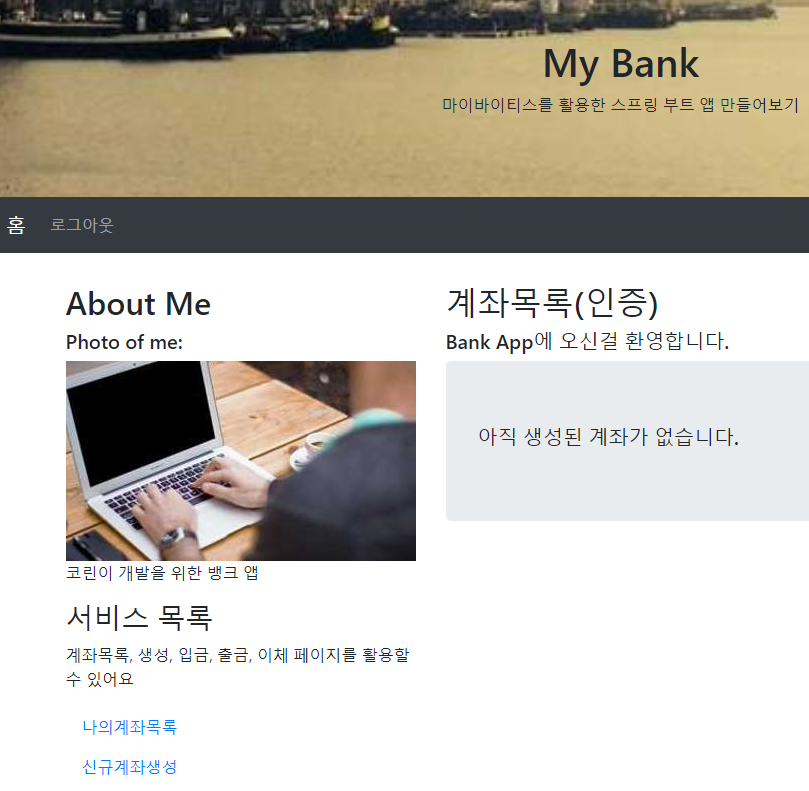
http://localhost:8080/account/list --> 나의 계좌 목록
http://localhost:8080/account/save --> 신규 계좌 생성
http://localhost:8080/account/list --> 나의 계좌 목록 (확인)

만약에 JSTL이 작동하지 않는다면 확인 (스프링부트 3.0 이상에서)
더보기

Gradle에 추가하면 된다.
list.jsp
더보기
list.jsp
<%@ page language="java" contentType="text/html; charset=UTF-8" pageEncoding="UTF-8"%>

<!-- header.jsp  -->
<%@ include file="/WEB-INF/view/layout/header.jsp"%>

<!-- start of content.jsp(xxx.jsp)   -->
<div class="col-sm-8">
	<h2>계좌목록(인증)</h2>
	<h5>Bank App에 오신걸 환영합니다.</h5>
	<%-- 주소 설계 : http://localhost:8080/user/sign-up  --%>


	<%-- 계좌가 없는 경우와 계좌가 있는 경우를 분리할 것이다. --%>
	<%-- 계좌가 있는 사용자 일 경우 반복문을 활용할 예정 --%>


	<c:choose>
		<c:when test="${accountList != null}">
			<%-- 계좌가 존재한다. html 주석사용하면 오류 발생 : 자바코드로 변경되면 오류발생 --%>
			<%-- 계좌 존재 : HTML 주석을 사용하면 오류 발생 (jstl 태그 안에서) --%>
			<table class="table">
				<thead>
					<tr>
						<th>계좌 번호</th>
						<th>잔액</th>
					</tr>
				</thead>
				<tbody>
					<c:forEach  var="account"   items="${accountList}">
						<tr>
							<td>${account.number}</td>
							<td>${account.balance}</td>
						</tr>
					</c:forEach>
				</tbody>
			</table>

		</c:when>
		<c:otherwise>
			<div class="jumbotron display-4">
				<h5>아직 생성된 계좌가 없습니다.</h5>
			</div>
		</c:otherwise>
	</c:choose>

</div>
<!-- end of content.jsp(xxx.jsp)   -->

</div>
</div>

<!-- footer.jsp  -->
<%@ include file="/WEB-INF/view/layout/footer.jsp"%>
AccountController.java
더보기
AccountController.java
package com.tenco.bank.controller;

import java.util.List;

import org.springframework.beans.factory.annotation.Autowired;
import org.springframework.http.HttpStatus;
import org.springframework.stereotype.Controller;
import org.springframework.ui.Model;
import org.springframework.web.bind.annotation.GetMapping;
import org.springframework.web.bind.annotation.PostMapping;
import org.springframework.web.bind.annotation.RequestMapping;

import com.tenco.bank.dto.SaveDTO;
import com.tenco.bank.handler.exception.DataDeliveryException;
import com.tenco.bank.handler.exception.UnAuthorizedException;
import com.tenco.bank.repository.model.Account;
import com.tenco.bank.repository.model.User;
import com.tenco.bank.service.AccountService;

import jakarta.servlet.http.HttpSession;

@Controller // IOC 대상 (싱글톤으로 관리)
@RequestMapping("/account")
public class AccountController {

	// 계좌 생성 화면 요청 - DI 처리
	private final HttpSession session;
	private final AccountService accountService;

	@Autowired
	public AccountController(HttpSession session, AccountService accountService) {
		this.session = session; // 의존 주입
		this.accountService = accountService; // 의존 주입
	}

	/**
	 * 계좌 생성 페이지 요청 주소설계 : http://localhost:8080/account/save :
	 *
	 * @return
	 */
	@GetMapping("/save")
	public String savePage() {

		// 1. 인증 검사가 필요 (account 전체가 필요함)
		User principal = (User) session.getAttribute("principal");
		if (principal == null) {
			throw new UnAuthorizedException("인증된 사용자가 아닙니다.", HttpStatus.UNAUTHORIZED);
		}

		return "account/save";
	}

	/**
	 * 계좌 생성 기능 요청
	 * 주소 설계 : http://localhost:8080/account/save
	 * @retrun : 추후 계좌 목록 페이지 이동 처리
	 */

	@PostMapping("/save")
	public String saveProc(SaveDTO dto) {
		// 1. form 데이터 추출 (파싱 전략)
		// 2. 인증 검사
		// 3. 유효성 검사
		// 4. 서비스 호출
		User principal = (User)session.getAttribute("principal");

		// 인증 검사
		if(principal == null) {
			throw new UnAuthorizedException("인증된 사용자가 아닙니다.", HttpStatus.UNAUTHORIZED);
		}

		if(dto.getNumber() == null || dto.getNumber().isEmpty()) {
			throw new DataDeliveryException("계좌 번호를 입력하세요.", HttpStatus.BAD_REQUEST);
		}

		if(dto.getPassword() == null || dto.getPassword().isEmpty()) {
			throw new DataDeliveryException("계좌 비밀번호를 입력하세요.", HttpStatus.BAD_REQUEST);
		}

		if(dto.getBalance() == null || dto.getBalance() <= 0) {
			throw new DataDeliveryException("계좌 잔액을 입력하세요", HttpStatus.BAD_REQUEST);
		}

		// 서비스에 dto와 유저아이디를 보낸다.
		accountService.createAccount(dto, principal.getId());

		return "redirect:/index";
	}

	/**
	 * 계좌 목록 화면 요청
	 * 주소 설계 : http://localhost:8080/account/list, ..../
	 * @return list.jsp
	 */
	// 페이지 리턴해야 되서 string으로 짓는다.
	@GetMapping({"/list", "/"})
	public String listPage(Model model) {

		// 1. 인증검사
		User principal = (User) session.getAttribute("principal"); // 유저세션 가져옴
		if(principal == null) {
			// 로그인을 안한 상태
			throw new UnAuthorizedException("인증된 사용자가 아닙니다.", HttpStatus.UNAUTHORIZED);
		}
		// 2. 유효성 검사

		// 3. 서비스 호출 (서비스컨트롤러 : 핵심기능 )
		List<Account> accountList = accountService.readAccountListByUserId(principal.getId());
		if(accountList.isEmpty()) {
			model.addAttribute("accountList", null);
		} else {
			model.addAttribute("accountList", accountList); // 모델에서 키,값을 던져버린다.
		}

		// JSP 데이터를 넣어 주는 방법
		return "account/list";

	}

}
accountService.java
더보기
accountService.java
package com.tenco.bank.service;

import java.util.List;

import org.springframework.beans.factory.annotation.Autowired;
import org.springframework.dao.DataAccessException;
import org.springframework.http.HttpStatus;
import org.springframework.stereotype.Service;
import org.springframework.transaction.annotation.Transactional;

import com.tenco.bank.dto.SaveDTO;
import com.tenco.bank.handler.exception.DataDeliveryException;
import com.tenco.bank.handler.exception.RedirectException;
import com.tenco.bank.repository.interfaces.AccountRepository;
import com.tenco.bank.repository.model.Account;

@Service // IoC 대상( 싱글톤으로 관리)
public class AccountService {

	private final AccountRepository accountRepository;

	@Autowired // 생략 가능 - DI 처리
	public AccountService(AccountRepository accountRepository) {
		this.accountRepository = accountRepository;
	}

	/**
	 * 계좌 생성 기능
	 * @param dto
	 * @param integer
	 */

	// 트랜 잭션 처리를 해야한다. (한번에 반영되거나, 아예 반영안되거나)
	@Transactional
	public void createAccount(SaveDTO dto, Integer principalId) {

		int result = 0;

		try {
			result = accountRepository.insert(dto.toAccount(principalId));

		} catch (DataAccessException e) {
			throw new DataDeliveryException("잘못된 요청입니다.", HttpStatus.INTERNAL_SERVER_ERROR);
		} catch(Exception e) {
			throw new RedirectException("알 수 없는 오류 입니다.", HttpStatus.SERVICE_UNAVAILABLE);
		}

		if(result == 0) {
			throw new DataDeliveryException("정상 처리 되지 않았습니다.", HttpStatus.INTERNAL_SERVER_ERROR);
		}

	}

	/**
	 *
	 * @param principal
	 */

	@Transactional
	public List<Account> readAccountListByUserId(Integer userId) {
		// TODO Auto-generated method stub
		List<Account> accountListEntity = null;

		try {
			accountListEntity = accountRepository.findByUserId(userId);
		} catch (DataDeliveryException e) {
			// TODO: handle exception
			throw new DataDeliveryException("잘못된 처리 입니다.", HttpStatus.INTERNAL_SERVER_ERROR);
		} catch (Exception e) {
			throw new RedirectException("알 수 없는 오류", HttpStatus.SERVICE_UNAVAILABLE);
		}


		return accountListEntity;

	}

}
AccountRepository.java
더보기
AccountRepository.java
package com.tenco.bank.repository.interfaces;

import java.util.List;

import org.apache.ibatis.annotations.Mapper;
import org.apache.ibatis.annotations.Param;

import com.tenco.bank.repository.model.Account;

// AccountRepository 인터페이스와 account.xml 파일을 매칭 시킨다.
@Mapper
public interface AccountRepository {
	public int insert(Account account);
	public int updateById(Account account);
	public int deleteBtId(Integer id, String name);

	// 고민! - 계좌 조회
	// --> 한 사람의 유저는 여러개의 계좌번호를 가질 수 있다. (리스트로 뽑아야 한다.)
	// @Param 사용이유 : interface 파라미터명과 xml에 사용할 변수명을 다르게 사용해야 된다면
	// @param 애노테이션을 사용할 수 있다. 그리고 2개 이상에 파라미터를 사용할 경우 반드시 사용.
	public List<Account> findByUserId(@Param("userId") Integer principalId);

	// --> account id 값으로 계좌정보 조회. (필요하다.)
	public Account findByNumber(@Param("number") String id);


}
account.xml
더보기
account.xml
	<select id="findByUserId" resultType="com.tenco.bank.repository.model.Account">
		select * from account_tb where user_id = #{userId}
	</select>


'Spring boot' 카테고리의 다른 글
| 2024.08.08 Bank App 출금 기능 만들기 -19 (0) | 2024.08.08 |
|---|---|
| 2024.08.08 Bank App 중간 리팩토링 -18 (0) | 2024.08.08 |
| 2024.08.07 Bank App 계좌 생성(유효성, 인증검사 중 누가 먼저 일까?) -16 (0) | 2024.08.07 |
| 2024.08.07 Bank App 만들기 헤더 링크 설정 및 JSTL 태그 활용 - 15 (0) | 2024.08.07 |
| 2024.08.07 Bank App 만들기 로그인 처리(세션 메모리지는 누가 관리하고 있을까?) -14 (0) | 2024.08.07 |