학습 목표

JSP 라이프사이클은에 대해 알아 보자.
JSP 라이프사이클이란?
JSP 라이프사이클은 JSP 페이지가 요청을 처리하기 위해 거치는 일련의 단계를 의미합니다.
JSP 페이지는 서블릿으로 변환되고, 컴파일되고, 요청을 처리한 후, 소멸되는 과정을 거칩니다.
즉, 라이프사이클은 JSP의 생성으로 시작하여 JSP의 해체로 끝납니다.
JSP : HTML 코드에 JAVA 코드를 넣어 동적웹페이지를 생성
1. JSP 페이지 번역 (Translation)
   └── example.jsp -> example_jsp.java
-- JSP 컨테이너는 JSP 파일을 서블릿 자바 파일로 변환합니다.

2. JSP 페이지 컴파일 (Compilation)
   └── example_jsp.java -> example_jsp.class
-- 서블릿 자바 파일을 컴파일하여 자바 바이트코드로 변환합니다.

3. 클래스 로딩 (Class Loading)
   └── example_jsp.class 로드
-- 컴파일된 클래스 파일을 JVM으로 로드합니다.

4. 인스턴스화 (Instantiation)
   └── new example_jsp()
-- 서블릿 클래스의 객체를 생성합니다.

5. 초기화 (Initialization)
   └── example_jsp._jspInit()
-- 서블릿 객체의 초기화 작업을 수행합니다.

6. 요청 처리 (Request Processing)
   └── example_jsp._jspService(request, response)
-- 라이언트의 요청을 처리하고 응답을 생성합니다.

7. 소멸 (Destroy)
   └── example_jsp._jspDestroy()
-- 서블릿 객체가 소멸될 때 자원을 해제합니다.
WAS (웹 애플리케이션 서버)
│
├── 웹 컨테이너 (Web Container)
│   │
│   ├── 서블릿 컨테이너 (Servlet Container)
│   │   ├── 서블릿 클래스 로딩
│   │   ├── 서블릿 인스턴스 생성
│   │   ├── 서블릿 초기화 (init)
│   │   ├── 요청 처리 (service, doGet, doPost)
│   │   └── 서블릿 소멸 (destroy)
│   │
│   └── JSP 컨테이너 (JSP Container)
│       ├── JSP 페이지 번역 (Translation)
│       ├── JSP 페이지 컴파일 (Compilation)
│       ├── 클래스 로딩 (Class Loading)
│       ├── 인스턴스화 (Instantiation)
│       ├── 초기화 (jspInit)
│       ├── 요청 처리 (jspService)
│       └── 소멸 (jspDestroy)
│
│
└── ...
class_jsp_v01 프로젝트
example.jsp
<%@ page language="java" contentType="text/html; charset=UTF-8"
    pageEncoding="UTF-8"%>

    <%@ page import="java.util.*" %>

<!DOCTYPE html>
<html>
<head>
<meta charset="UTF-8">
<title>Insert title here</title>
</head>
<body>

	<%
		// http://localhost:8080/jsp/example.jsp

		// 초기화 단계(jspInit 역할)
		if(application.getAttribute("initialized") == null){
			application.setAttribute("initialized", true);
			application.setAttribute("initialized", new Date());
			out.println("JSP가 초기화 되었습니다. <br>");
		}

		out.println("요청이 완료 되었습니다. <br>");
		out.println("현재 시간 : " + new Date() + " <br>");
	%>


</body>
</html>
처음 실행하게 되면 initialized 가 null 이기 때문에 if문이 작동하여 "JSP가 초기화 되었다" 라는 문구를 출력한다.
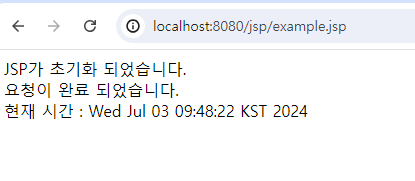
새로고침 하게되면 initialized 가 있기 때문에 아래와 같이 출력된다.

example.jsp
<%@ page language="java" contentType="text/html; charset=UTF-8"
    pageEncoding="UTF-8"%>

    <%@ page import="java.util.*" %>

    <%
		// 주소 - http://localhost:8080/jsp/example.jsp
		// getAttribute - 특정 요소노드 내에서 특정 한 속성값을 가져오는 메소드

		// 초기화 단계(jspInit 역할)
		if(application.getAttribute("initialized") == null){ // 자료구조 Map을 다시 보자.
			application.setAttribute("initialized", true);
			application.setAttribute("initialized", new Date());
			out.println("JSP가 초기화 되었습니다. <br>");
		}

		out.println("요청이 완료 되었습니다. <br>");
		out.println("현재 시간 : " + new Date() + " <br>");

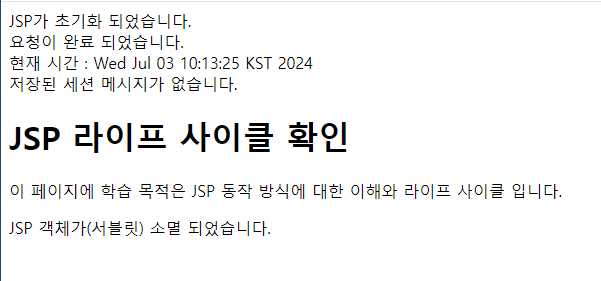
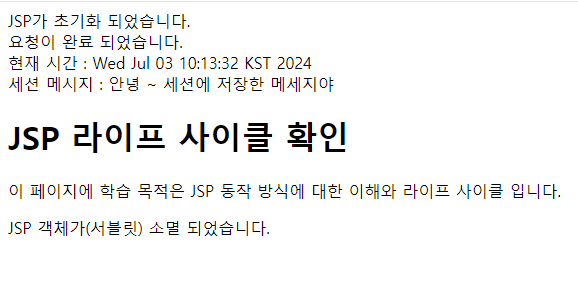
		// 세션이라는 전역 메모리지에 데이터를 저장하고 확인해 보자
		String message = (String)session.getAttribute("message");

		if(message != null){
			out.println("세션 메시지 : " + message);
		} else {
			out.println("저장된 세션 메시지가 없습니다.");
		}

		// 세션이라는 메모리에 key, value 를 할당하자.
		session.setAttribute("message", "안녕 ~ 세션에 저장한 메세지야");

	%>

<!DOCTYPE html>
<html>
<head>
<meta charset="UTF-8">
<title>Insert title here</title>
</head>
<body>

	<h1>JSP 라이프 사이클 확인</h1>
	<p>이 페이지에 학습 목적은 JSP 동작 방식에 대한 이해와 라이프 사이클 입니다.</p>

</body>
</html>

<%
	// 소멸 단계 확인 (jspDestory)
	if(application.getAttribute("initialized")!= null){
		application.removeAttribute("initialized");
		application.removeAttribute("initializedTime");
		out.println("JSP 객체가(서블릿) 소멸 되었습니다. <br>");
	}

%>
'Java' 카테고리의 다른 글
| 2024.07.03 JSP 프로그래밍 기본 JSP 주석과 지시자 (미완) (0) | 2024.07.03 |
|---|---|
| 2024.07.03 JSP 프로그래밍 기본 JSP 기초 문법 (0) | 2024.07.03 |
| 2024.07.03 JSP 프로그래밍 기본 JSP(Java Server Pages)란? (0) | 2024.07.03 |
| 2024.07.03 dynamic Web Project의 web.xml 오류 해결 (0) | 2024.07.03 |
| 2024.07.02 CSS flexbox flex-wrap 이해하기 (0) | 2024.07.02 |