class_36.sql
my_quiz --> cohttp://m.tenco.quiz --> ver04
DBConnectionManager.java
0.00MB
LoginExample.java
0.00MB
💡 학습 목표
- JDBC에서 발생할 수 있는 예외를 이해하고 효과적으로 처리하는 방법을 배웁니다.
- 예외 발생 시 로그를 기록하고, 사용자에게 유용한 피드백을 제공하는 방법을 알아 보자.
SQLException 이란?
SQLException은 JDBC에서 발생할 수 있는 일반적인 예외입니다.
이 예외는 데이터베이스와의 통신 중에 발생하는 오류를 나타냅니다.
SQLException은 다양한 속성과 메서드를 제공하여 예외에 대한 상세한 정보를 제공합니다.
- 주요 속성 및 메서드:
- getErrorCode()
데이터베이스 벤더가 제공하는 특정 오류 코드를 반환합니다. - getSQLState()
SQLState 코드를 반환합니다.
이 코드는 표준 SQL 상태 코드를 나타냅니다. - getMessage()
예외 메시지를 반환합니다. - getNextException()
체인된 예외를 반환합니다.
- getErrorCode()
sql 작성 class_36.sql
-- -----------------------------
-- JDBC에서의 예외 처리

-- DML DCL DDL
-- 컬럼 추가하는 쿼리를 만들어 보자.

-- drop table user;

create table users(
	id int auto_increment primary key,
    username varchar(100) not null unique,
    password varchar(100) not null
);

desc users;

alter
table users
add column email varchar(100) null;

-- 이메일 에다가 Unique 제약을 추가해 보자
alter
table users
add constraint unique_email unique(email);

select *
from users;

insert into users(username, password, email)
values ('홍길동', 'asd123', 'a@naver.com'),
	   ('이순신', 'asd123', 'b@naver.com'),
	   ('박태환', 'asd123', 'c@naver.com');

select * from users where username = '홍길동' and passowrd = 'asd123';
DBConnectionManager
package com.tenco.quiz.ver4;

import java.sql.Connection;
import java.sql.SQLException;

import com.zaxxer.hikari.HikariConfig;
import com.zaxxer.hikari.HikariDataSource;

public class DBConnectionManager {

	/*
	 * 커넥션 풀을 활용하는 예제로 수정해 보자.
	 * HikariCP-5.1.0.jar lib 설정
	 */

	private static HikariDataSource dataSource;


	private static final String URL = "jdbc:mysql://localhost:3306/demo3?serverTimezone=Asia/Seoul";
	private static final String USER = "root";
	private static final String PASSWORD = "asd123";

	static {
		// HikariCP 를 사용하기 위한 설정이 필요하다.
		// HikariConfig --> 제공해줘서 이 클래스를 활용해서 설정을 상세히 할 수 있다.
		HikariConfig config = new HikariConfig(); // 객체를 메모리에 올려본다.
		config.setJdbcUrl(URL);
		config.setUsername(USER);
		config.setPassword(PASSWORD);

		config.setMaximumPoolSize(10); // 최대 연결 수 설정 10개이다.

		dataSource = new HikariDataSource(config); // 기본 객체가 생성이 된다.

	}

	public static Connection getConnection() throws SQLException{
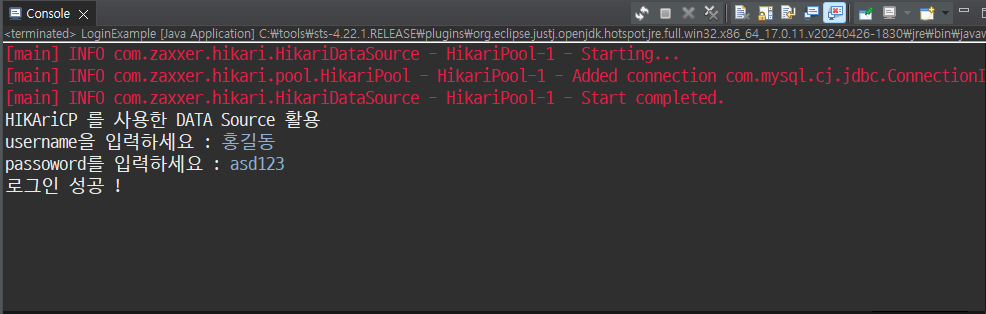
		System.out.println("HIKAriCP 를 사용한 DATA Source 활용");
		return dataSource.getConnection();
	}

	// 테스트 코드 확인
	public static void main(String[] args) {

		try {
			Connection conn = DBConnectionManager.getConnection();
		} catch (SQLException e) {
			e.printStackTrace();
		}

	} // end of main

	// 정적 메서드(함수) 커넥션 객체를 리턴하는 함수를 만들어 보자
	// 기본 JDBC 드라이버 사용 버전
//	public static Connection getConnection() throws SQLException {
//		return DriverManager.getConnection(URL, USER, PASSWORD);
//	}


} // end of class
LoginExample
package com.tenco.quiz.ver4;

import java.sql.Connection;
import java.sql.PreparedStatement;
import java.sql.ResultSet;
import java.sql.SQLException;
import java.util.Scanner;
import java.util.logging.Level;
import java.util.logging.Logger;

public class LoginExample {

	// 개발 테스트를 위한 로깅 처리 및 로그

	private static final Logger LOGGER = Logger.getLogger(LoginExample.class.getName());

	public static void main(String[] args) {

		// DataSource를 활용한 Connection 객체를 사용하자.

		try {
			// HikariCP 가 담김
			Connection conn = DBConnectionManager.getConnection();
			// username, password를 받아서 확인 해야 한다.

			Scanner scanner = new Scanner(System.in);

			System.out.print("username을 입력하세요 : ");
			String username = scanner.nextLine();

			System.out.print("passoword를 입력하세요 : ");
			String password = scanner.nextLine();

		if (authenticateUser(conn, username, password)) {
			System.out.println("로그인 성공 ! ");
		} else {
			System.out.println("로그인 실패 - username과 password를 확인해주세요.");
		}

			// select * from users where username = '홍길동' and passowrd = 'asd123';

		} catch (SQLException e) {
			LOGGER.log(Level.INFO, "MySQL 연결 오류 ");
			e.printStackTrace();

		}

	} // end of main

	private static boolean authenticateUser(Connection conn, String username, String password) {

		String query = " select * from users where username = ? and password = ? ";
		boolean result = false;
		try {
			PreparedStatement pstmt = conn.prepareStatement(query);
			pstmt.setString(1, username);
			pstmt.setString(2, password);
			ResultSet rs = pstmt.executeQuery();
			result = rs.next();


		} catch (SQLException e) {
			e.printStackTrace();
		}

		return result;
	}

} // end of class
'Java' 카테고리의 다른 글
| 2024.06.18 JDBC 실습 예제 (같이 만들어보기) (0) | 2024.06.18 |
|---|---|
| 2024.06.17 Data Structure(자료구조) JDBC 실습 예제 (0) | 2024.06.17 |
| 2024.06.17 Data Structure(자료구조) JDBC 성능 최적화 (0) | 2024.06.17 |
| 2024.06.14 Data Structure(자료구조) JDBC를 활용한 CRUD 와 SOLID 원칙 - 7 (0) | 2024.06.14 |
| 2024.06.13 Data Structure(자료구조) JDBC 트랜잭션 관리와 배치 처리(2) (0) | 2024.06.13 |