자바프로젝트 wrapper_ex --> src --> ch01 --> MainTest1.java
자바프로젝트 wrapper_ex --> src --> ch01 --> MainTest2.java
MainTest1.java
0.00MB
MainTest2.java
0.00MB
래퍼 클래스
https://blog.naver.com/devnote1
blog.naver.com/devnote1 : 네이버 블로그
당신의 모든 기록을 담는 공간
blog.naver.com
래퍼 클래스 란?
기본 타입에 해당하는 데이터를 객체로 포장하는 클래스를 의미한다.
자바의 자료형은 크게 기본 타입(primitive type)과 참조 타입(reference type)으로 나누어집니다.
대표적으로 기본 타입은 char, int, float, double, boolean 등이 있고 참조 타입은 class, interface 등이 있다.
프로그래밍을 하다 보면 기본 타입의 데이터를 객체로 표현해야 하는 경우가 종종 있습니다.
이럴 때 기본 자료타입(primitive type)을 객체로 다루기 위해서 사용하는 클래스들을 래퍼 클래스(wrapper class)라고 함
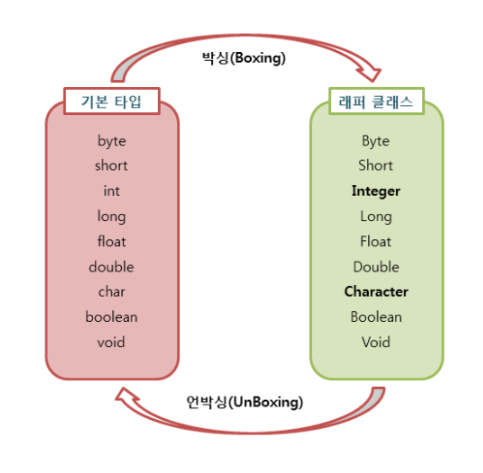
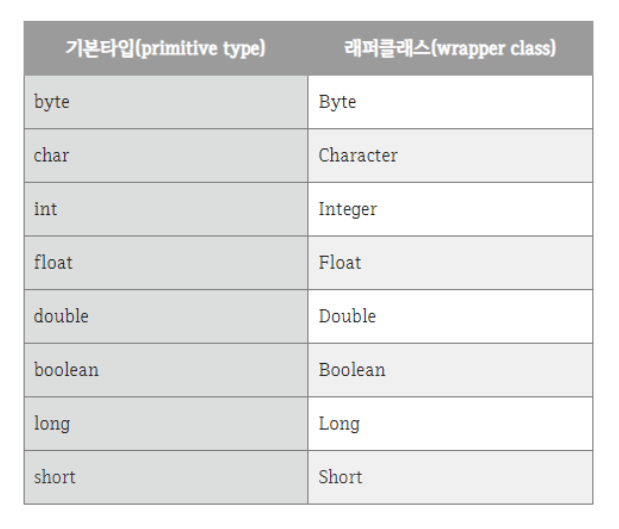
MainTest1
문자열에서 해당 데이터 타입으로 변환은 래퍼클래스 활용
더보기
package ch01;

public class MainTest1 {

	public static void main(String[] args) {

		int num1 = 3; // ---> int의 래퍼 클래스는 Integer 이다

		//  박싱 : 감싸다. @Deprecated --> 이제 지원을 안한다는 뜻
		//	@Deprecated : 더 이상 지원하지 않음

		Integer num2 = new Integer(3); // 박싱
		int num3 = num2.intValue(); // 언박싱

		System.out.println(num2);
		System.out.println(num3);

		// 2단계 - 자동 박싱, 자동언박싱 용어를 이해하자.

		Integer num4 = 17; // 자동 박싱 int <-- Wrapper --> Integer 변환 된것 !

		// num4 = Integer 이다. (래퍼클래스)
		// num5 = int 이다. (기본타입)
		int num5 = num4; // 자동 언박싱 개념


	} // end of main

} // end of class
MainTest2
문자열에서 해당 데이터 타입으로 변환은 래퍼클래스 활용
기본 데이터 타입에서 String 타입으로 변환은 String.valueOf() 메서드를 사용하자.
더보기
package ch01;

public class MainTest2 {

	public static void main(String[] args) {

		String str1 = "10A";
		String str2 = "20.5";
		String str3 = "true";

		System.out.println(str2 + 100);

		// str1 안에 있는 10 이라는 문자를 숫자로 변경하고 싶다면? (str1 <-- 10)

		// 문자열에 데이터(String)타입을 정수(Int)값을 변경하는 방법
		// 예외처리를 해줘야 한다.

		try {
			int n1 = Integer.parseInt(str1);
			System.out.println(n1+100); // int 값으로 변경되었다.
		} catch (Exception e) {
			// TODO: handle exception
			System.out.println("잘못된 입력 값입니다.");
		}

		// str2 ---> double ---> 8byte
		double d = Double.parseDouble(str2); // double 값으로 변경되었다.
		System.out.println(d);

		// str3 ---> boolean ---> 1byte
		boolean b = Boolean.parseBoolean(str3);
		System.out.println(b);

		// -------------------------------------------------------------

		// 반대로 INT 값을 ---> String 데이터 타입으로 변환하고 싶다면?
		int number = 10000;

		String numberStr = String.valueOf(number);
		System.out.println(numberStr);


	} // end of main

} // end of class
'Java' 카테고리의 다른 글
| 2024.06.13 Data Structure(자료구조) JDBC 트랜잭션 관리와 배치 처리(2) (0) | 2024.06.13 |
|---|---|
| 2024.06.12 Data Structure(자료구조) JDBC 트랜잭션 관리와 배치 처리 (0) | 2024.06.12 |
| 2024.06.11 Data Structure(자료구조) JDBC 데이터 기본 조작(CRUD) (0) | 2024.06.11 |
| 2024.06.11 Data Structure(자료구조) JDBC 기본 사용법 (0) | 2024.06.11 |
| 2024.06.11 Data Structure(자료구조) JDBC 설치 및 설정 (0) | 2024.06.11 |